Showing posts with label iPod. Show all posts

Saturday, February 15, 2014

Augmented Reality Fun with colAR Mix Plus, a Tutorial.

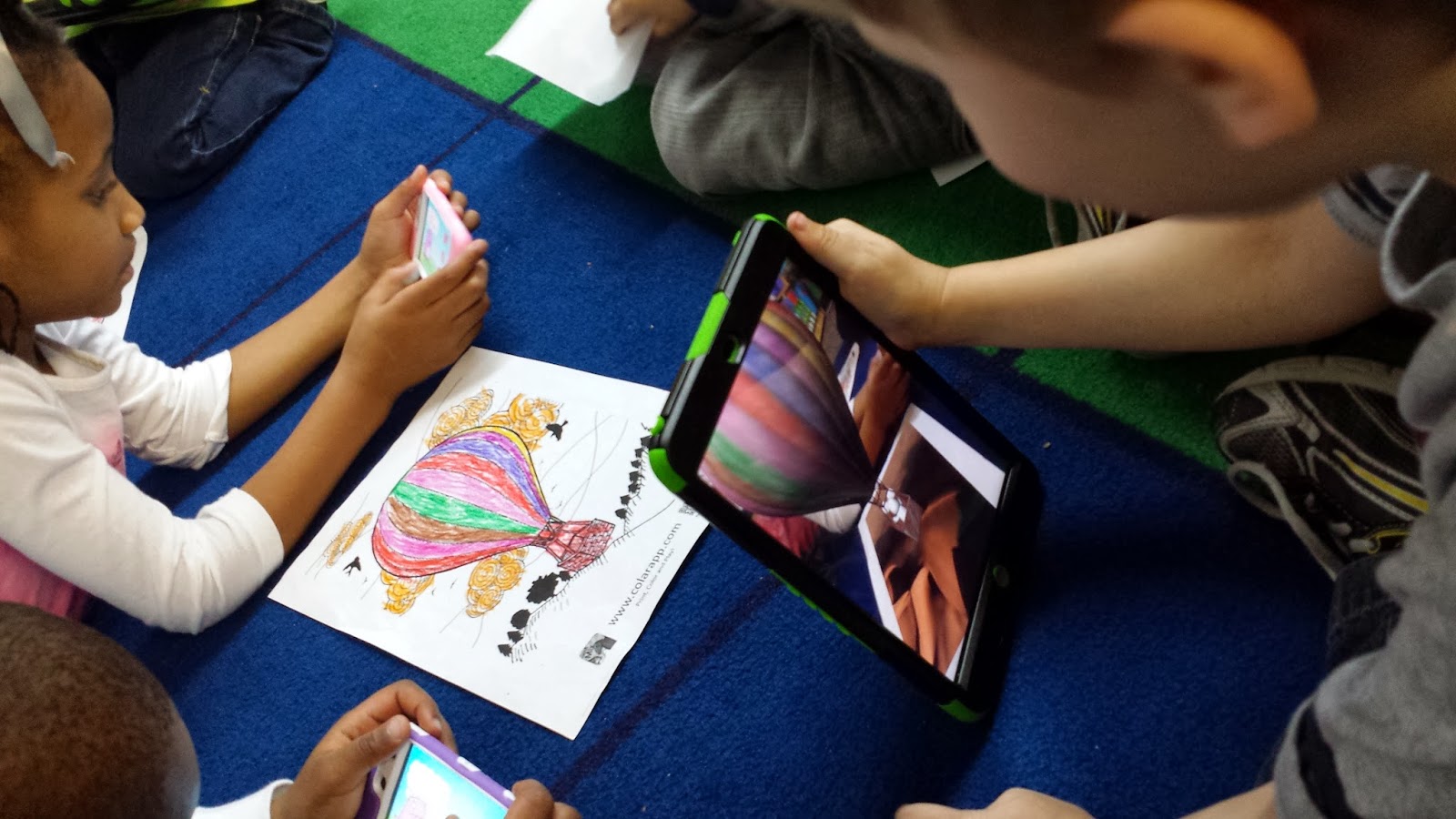
Think 4 year olds are too young for augmented reality?  If you said, "Yes!" you're wrong!!  Take a look at this video (parental permission) of 4 and 5 year old PreK students at their first look at augmented reality (AR).


I put the colAR Mix app on my ipads/ipods and downloaded ALL of the coloring sheets that were available on the colARapp website.  One set of coloring pages is free, the others are all paid.  Since I loved several pages from each, I went ahead and got them all and I am SO GLAD I did!!  I would highly recommend them all.

At first glance they look like regular coloring pages, but they're not.  Not at all!  Once you've downloaded the colAR coloring pages of your choice, allow the students to color them using map pencils, crayons, or markers.  Now, be aware that coloring too dark near the outlines will keep the app from 'catching' the picture.  Also, the app does like to have some white in the background as well.  Both help the app identify the page.

 Go to your colAR app on your device and touch the Play! icon.  Position your device over the colAR coloring page, about 12 inches away or until the screen turns blue and "locks" your picture.  If this is your first time to use it, you'll know it has activated when your jaw drops and your eyes get real big! LOL

Now the fun really begins!  There is so much to explore now that the picture is activated.  Making sure that the entire page is still in the screen, move the device slowly down to in front of the page like the boy has done in this picture.  It will give you the front view.  You can move in closer to see the picture bigger.  Sometimes, there is an icon on the screen for that particular picture.  If there is, make sure to touch it to see what happens!  It is hard wrapping your mind around the inanimate paper coming to life!  But the animation takes on the coloring you've done.

This app is definitely one that you'll enjoy as much as the students.  It is for ANY grade level.


Monday, April 1, 2013

Adjectives A Fishy Tale of Task Cards & QR Codes

I had so much fun making these task cards!!  Can't wait to share them with our 2nd grade team!  I love the little fishing guy...but I especially love that there are 60 task cards in this lesson and all with a QR code.  Even if you didn't have an iPod these could be used as regular task cards.


Tuesday, March 5, 2013

iPads and iPods in the Classroom

Does anyone have iPads or iPods in their classroom? How many? Anyone have an ENTIRE classroom set? I was wanting to know pros and cons of having an entire set? One thought I had, which I thought there were only PROS on this topic, but does it reduce the time of doing hands on activities when you have them on iProducts only?

Tuesday, February 26, 2013

Technology Fair

I am part of our district's Geek Squad and love it! I am Geek inside and out whether I like it or not. Recently, our grand GeekMaster invited us to join in on a Technology Fair for our district to show off the kinds of technology we use in our classrooms. I am so excited about this! I love using technology in my Pre-K classroom. From the SMARTboard to the computers to iPad and iPods, we use a little of everything. In fact, this is our schools FIRST year for our Pre-K to use anything with technology!

I had an idea of what I wanted to present: re-telling a story on the iPad using the Puppet Pals app. If you've never used Puppet Pals it is so much fun! The kids love it as it it completely kid friendly. I bought the upgraded version for just a few bucks to get all the good characters. It will also include any new characters the app brings on. There is a page for characters, a backgrounds page, and an accessory page. On the character page you can even take a picture of a student, use the cut out button and use YOUR STUDENT as the character!! I love that part of it! Once you choose your characters and your background and any other goodies you want, you hit the RECORD button and you can make your very own video.

My project? Well, our story folder this week was "The Great Enormous Rock." Just a short story about an elephant, a rabbit, a turtle, and a snake who wanted to play at the top of the hill but there was a great enormous rock at the top of it and they had to move it. The first three animals couldn't move the rock, but the snake came along and said he would help. Of course, the elephant laughed at him because he was too small to help. But the snake ignored him, rolled himself into a ball, and whacked the giant rock and sent it rolling down the hill. (Sorry, I just gave away the ending and didn't even give you a spoiler warning!)

So, I chose my sweetie who can TELL A STORY!! Oh my, she can go on and she is very creative as she goes on and on and on. Shall I mention that this is my sweetie who is my only spitter, kicker, runner, hitter? Yeah, she is. BUT, she is also my little genius! She is too adorable to even put into words, but she does have her moments! =D

So, I read her the story again (just the two of us) and asked her to use the characters to re-tell the story. In ONE shot, she retold it with expression, with different voices for each character, and with details. Yes, she has just turned five! I can't wait to see her when gets into UIL once she hits second grade!! Anyway, that will be my entry for the Technology Fair. If you have an iPad or iPod I strongly recommend Puppet Pals. There are American History characters, farm animals, fairy tale, famous people, and many more with matching backgrounds for each.

Has anyone else used something similar to this with their kiddos? I'd love to hear about it!